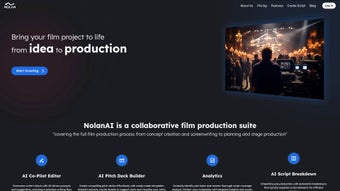

Download NolanAi – AI‑Powered Movie Script Writing Assistant, Free & Offline
Overview
NolanAi is a next‑generation, free movie script writing assistant that brings the power of artificial intelligence directly to your desktop. Designed for screenwriters of every skill level, NolanAi automatically formats scenes, dialogues, and action blocks so you can concentrate on the art of storytelling. What truly sets it apart is its offline capability: once installed, the entire AI engine runs locally, meaning you can write, edit, and polish scripts without ever needing an internet connection.
Whether you’re drafting a Hollywood blockbuster, an indie feature, or a short film, NolanAi’s intuitive interface streamlines the entire workflow—from brainstorming ideas to delivering a properly formatted screenplay ready for submission. The tool also includes a live demo mode that lets you experiment with AI‑generated suggestions in real time, giving you instant feedback on pacing, character arcs, and genre conventions. By removing technical barriers, NolanAi helps you stay in the creative zone, turning flashes of inspiration into polished pages, no matter where you are.
Key Features
- Offline AI Engine – All AI processing happens locally, ensuring you can write anywhere, even on a plane or in a remote cabin.
- Automatic Script Formatting – Instantly converts raw text into industry‑standard screenplay layout (FADE IN, INT./EXT., dialogue blocks, etc.).
- Live Demo Mode – Interact with a real‑time AI companion that suggests scene structures, character dialogue, and plot twists as you type.
- Story Structure Guidance – Built‑in templates for three‑act, four‑act, and episodic formats, complete with beat suggestions.
- Version Control & Backup – Automatic local versioning lets you revert to earlier drafts without leaving the app.
- Customizable Themes – Dark, light, and high‑contrast UI themes to match your working environment and reduce eye strain.
- Export Options – Export to PDF, Final Draft (.fdx), Fountain, or plain text with a single click.
- Multi‑Language Support – Interface available in English, Spanish, French, and Mandarin, making it accessible worldwide.
- Keyboard Shortcuts – Speed up navigation with shortcuts for scene headings, character names, and action blocks.
- Free Core Version – All core functionalities are free, with optional premium plugins for advanced analytics.
Installation, Usage & Compatibility
Getting started with NolanAi is straightforward, and the process has been optimized for both Windows and macOS users. Follow these steps to install and begin writing your screenplay:
- Download the Installer – Visit the official NolanAi website and click the “Download for Windows” or “Download for macOS” button. The file size is under 150 MB, making it quick to download even on slower connections.
- Run the Installer – On Windows, double‑click the
.exefile; on macOS, open the.dmgand drag the NolanAi icon to your Applications folder. The installer verifies your system’s compatibility and guides you through a standard “Next‑Step” wizard. - Grant Permissions – Because NolanAi runs a local AI model, the installer requests permission to access your local storage for saving drafts and version history. Approve these prompts to ensure smooth operation.
- Launch the Application – After installation, open NolanAi from the Start menu (Windows) or Launchpad (macOS). The first launch may take a few seconds as the AI engine loads its model files.
- Set Up Your Project – Click “New Project,” give your script a title, select a template (e.g., Feature Film, TV Pilot), and choose your preferred formatting style. NolanAi will automatically create a structured folder for your script, notes, and exported files.
- Start Writing – Begin typing in the main editor. As you type, NolanAi’s AI suggestions appear in a side panel. You can accept a suggestion with a single click or dismiss it to keep your original line.
- Use Live Demo – If you want to explore AI‑generated ideas without affecting your draft, activate “Live Demo” from the toolbar. This sandbox mode lets you experiment with alternate scenes, dialogue variations, or even whole plot outlines.
- Export & Share – Once your script is complete, click the “Export” button and choose the desired format. The exported file retains all industry‑standard formatting, ready for submission to agents or production companies.
Compatibility: NolanAi supports Windows 10/11 (64‑bit) and macOS 12 Monterey or later. The application runs efficiently on laptops with at least 8 GB RAM and a dual‑core processor. Because the AI model is lightweight, it also works on modest hardware, making it ideal for students and independent creators who may not have high‑end machines.
Pros, Cons & Frequently Asked Questions
Pros
- Fully offline – write anywhere without internet.
- Free core version with professional‑grade formatting.
- Real‑time AI suggestions accelerate brainstorming.
- Multiple export formats keep you compatible with industry tools.
- Version control built‑in, eliminating the need for external backup solutions.
Cons
- Advanced analytics (e.g., marketability scoring) require premium plugins.
- Initial AI model loading may cause a brief delay on older computers.
- No native mobile app yet; only desktop platforms are supported.
FAQ
Is NolanAi really free?
Yes, the core application is completely free. You can write, format, and export scripts without paying a cent. Optional premium add‑ons are available for users who want deeper analytics or collaboration features.
Can I use NolanAi on a laptop without internet?
Absolutely. After the initial download and installation, all AI processing occurs locally, so you can write on a plane, in a cabin, or anywhere else without a network connection.
What file formats does NolanAi export to?
NolanAi supports PDF, Final Draft (.fdx), Fountain, and plain‑text (.txt) exports. All exported files retain industry‑standard screenplay formatting.
Is there a Mac version of NolanAi?
Yes. NolanAi runs on macOS 12 Monterey and later. The installation process is identical to Windows, using a simple drag‑and‑drop installer.
How does the AI suggest dialogue?
The AI analyzes the context of the scene, character traits you define, and genre conventions. It then generates dialogue options that fit the tone and pacing, which you can accept, modify, or discard.
Conclusion – Start Your Screenwriting Journey with NolanAi Today
For anyone serious about crafting compelling movie scripts, NolanAi delivers a powerful blend of AI assistance, industry‑standard formatting, and true offline freedom—all at no cost. The learning curve is minimal thanks to its clean UI, and the live demo mode offers an inspiring sandbox for both beginners and seasoned writers. While premium add‑ons exist for deeper analytics, the free version already equips you with everything needed to turn ideas into polished screenplays ready for submission. Don’t let technical hurdles stall your creativity; download NolanAi now, install it on your Windows or Mac machine, and experience the future of scriptwriting at your fingertips.
Pros: Offline AI, free core, automatic formatting, multi‑export.
Cons: No mobile app, premium analytics optional.



.png)



